
One-Time Activation, Multi-Country Travel
No Limit on Data Use. Worry-Free Roaming.

No Surprise Charge

Multi-Country Flexibility

No New SIM Needed
Where are you traveling to?
Get detail information on roaming rates
cellcard AO ROAMING Daily Capped Pack
cellcard AO ROAMING Daily Capped Pack
$2.00
 Laos
Laos Malaysia
 Singapore
 Vietnam
 Bangladesh
 Pakistan
 Use data as much as you want
  Valid for 24 hours Day
cellcard AO ROAMING Daily Capped Pack
$5.00
 Brunei Darussalam
 China
China Denmark
 Finland
 France
 Indonesia
 Norway
 Russia
 South Africa
 South Korea
- Use data as much as you want
- Valid for 24 hours Day


cellcard AO ROAMING Daily Capped Pack
$10.00
 Switzerland
 United States
- Use data as much as you want
- Valid for 24 hours Day
cellcard AO ROAMING Daily Capped Pack

No subscription, just one time activation
Charge starts only when you use data abroad
Charges stop after reaching daily cap
After capped, continue data usage without limit for whole day (24 hours from first use in the day)

Calls & SMS charged separately (Standard PayGo - Pay based on your usage)

How to Activate Roaming Service
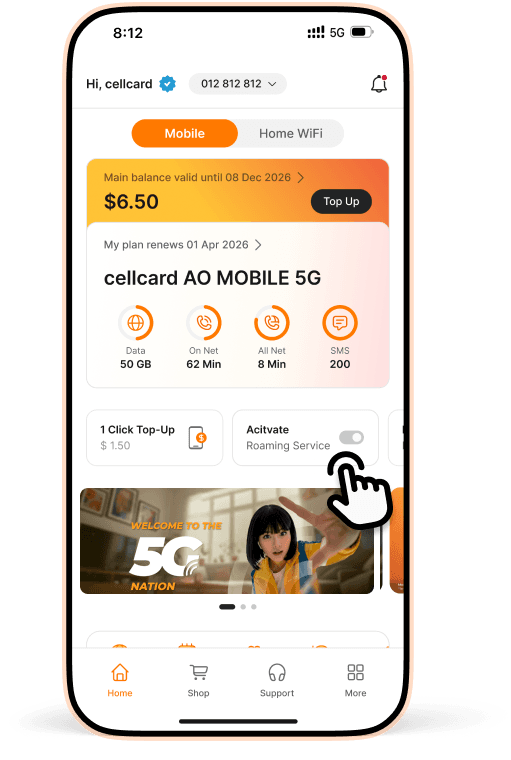
Step 1
Tap on Activate Roaming Service in cellcard app
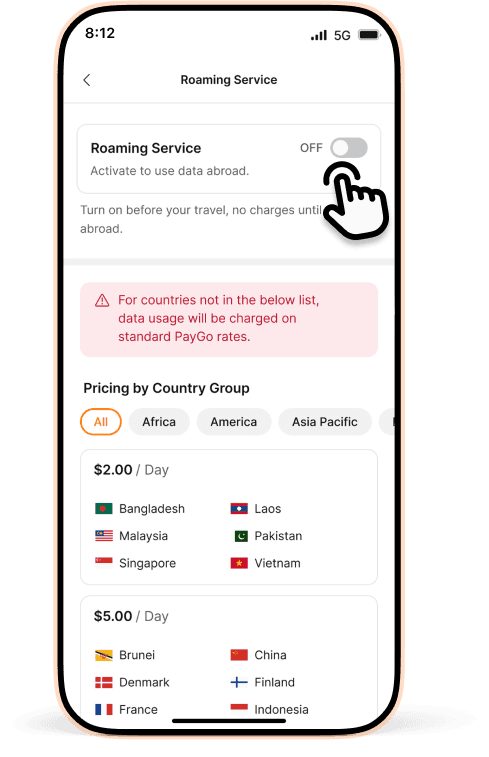
Step 2
Tap to Activate.
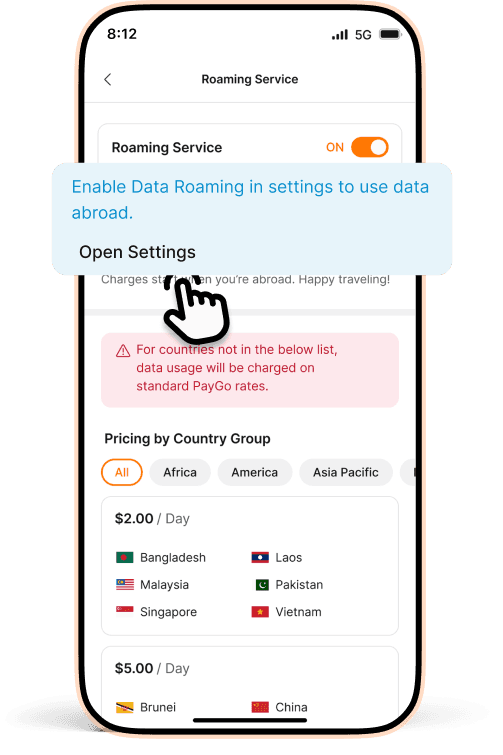
Step 3
Open setting, go to Cellular / Mobile Networks.
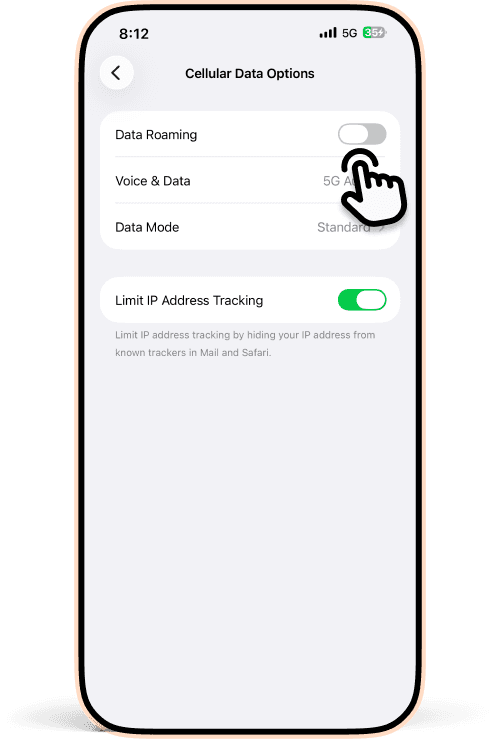
Step 4
Turn ON Data Roaming. (If you’re on dual SIM, select a SIM first)
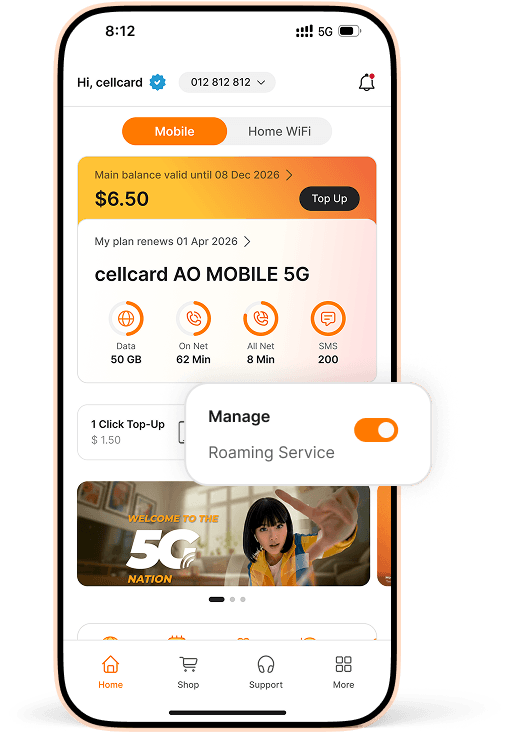
You're all set!
Roaming service is now active and ready for your trip.
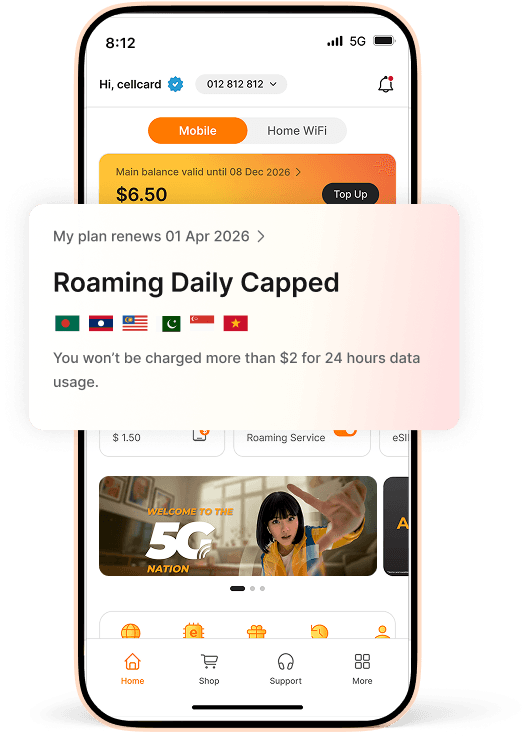
When You're Abroad
Your mobile data will connect automatically.
Video Tutorial
Terms & Conditions
- Customers must activate roaming services before leaving Cambodia. To activate, dial *1206# or via cellcard app.
- Customers must ensure that both Cellular Data and Data Roaming are enabled in their phone's settings.
- For customers who have already activated roaming, no further activation is required. Customers can use data, make/receive calls, and send/receive SMS, with all usage charged at standard roaming rates. Once customers reach the daily price cap, they can continue using data for the remaining of the day at no additional cost. If data usage remains below the designated price cap, customers will only be charged for their actual consumption.
- Charge rates vary by country you are visiting.
- The AO Roaming Daily Capped resets every 24 hours, starting from the moment customers first begin using data abroad. (Example: If customers start using data in Singapore on 01 January 2026 at 9:00 AM and reach the daily cap (e.g., $2) by 10:00 AM, they can continue using data at no additional cost until 02 January 2026 at 9:00 AM.)
- If customers travel to another country within the same day, data usage will be charged according to the specific rates and caps set for that respective country.
- To disable roaming services, customers can dial *1200# or *1206*0#, or via cellcard app.
Troubleshooting
If the roaming service is not working, please follow the instructions below:
For iOS
1. Go to Settings > Select Cellular
2. Turn on Cellular Data > Select Cellular Data Options
3. Turn on Data Roaming
4. Fill in “cellcard” in APN
For Android
1. Launch your phone’s Settings app
2. Navigate to Connections > Mobile Networks > Turn on Data Roaming
3. Fill in “cellcard” in APN
 Facebook Messenger
 Telegram